tfflick
https://github.com/ggaacode/tfflick
Description
tfflick is a Powershell Terraform version manager module. tfflick downloads the specific version you require and switches between them.
tfflick is a Powershell alternative for tfswitch Terraform version manager.
Installation is quick and and you can start using Terraform straight away.
Terraform executables are downloaded from https://releases.hashicorp.com/terraform/ using Tls12 protocol
tfflick Currently has been tested on Powershell version 5.1 and currently only downloads the Windows AMD64 versions of the Terraform executable
Download
-
In Powershell run this command replacing the path to your downloads directory and extract the contents of the zip file.
Invoke-WebRequest -URI https://github.com/ggaacode/tfflick/archive/refs/tags/v0.1.3.zip -OutFile <Downloads Directory>tfflick.zip -
Direct download link https://github.com/ggaacode/tfflick/archive/refs/tags/v0.1.3.zip
Installation
Using the installer
Note, you’ll need to check your Powershell execution policy before you can run the installer install_tfflick.ps1 and use tfflick in general.
- As Administrator, run
Get-ExecutionPolicy -Listto get your current execution policy. You should see something like this:Scope ExecutionPolicy ----- --------------- MachinePolicy Undefined UserPolicy Undefined Process Undefined CurrentUser Undefined LocalMachine RemoteSigned -
Ideally LocalMachine should be set to at least RemoteSigned and the tfflick.psm1 module file is unblocked by running the
Unblock-Filecommand.Unrestricted or Bypass would not require the file to be unblocked.
-
Changing the execution policy. As Administrator, run
Set-ExecutionPolicy RemoteSigned -Scope LocalMachine -
Unblocking tfflick
The installation script can unblock the tfflick.psm1 module script by passing the
unblock-tfflickargument as administrator. See below for details.If you don’t unblock the module, Powershell will prompt you and ask if you want the file to be unblocked and give you the exact command to run the first time you run tfflick.
For example
Unblock-File -Path 'C:\**home directory**\Documents\WindowsPowerShell\Modules\tfflick\tfflick.psm1'to run as Administrator. - For more information about Powershell execution policies, see https://learn.microsoft.com/en-us/powershell/module/microsoft.powershell.core/about/about_execution_policies?view=powershell-5.1
Run the Installer
Open Poweshell as Administrator and navigate to the extracted tfflick downloaded directory.
To run the installer when the execution policy is set to LocalMachine RemoteSigned, you need to temporarily set it to Process Bypass to be able to install tfflick. This is only valid for the current session of Powershell.
Run Set-ExecutionPolicy Bypass -Scope Process
Run .\install_tfflick.ps1 if you don’t want the module to be unblocked by the installer
Or .\install_tfflick.ps1 unblock-tfflick to unblock the module during installation
-
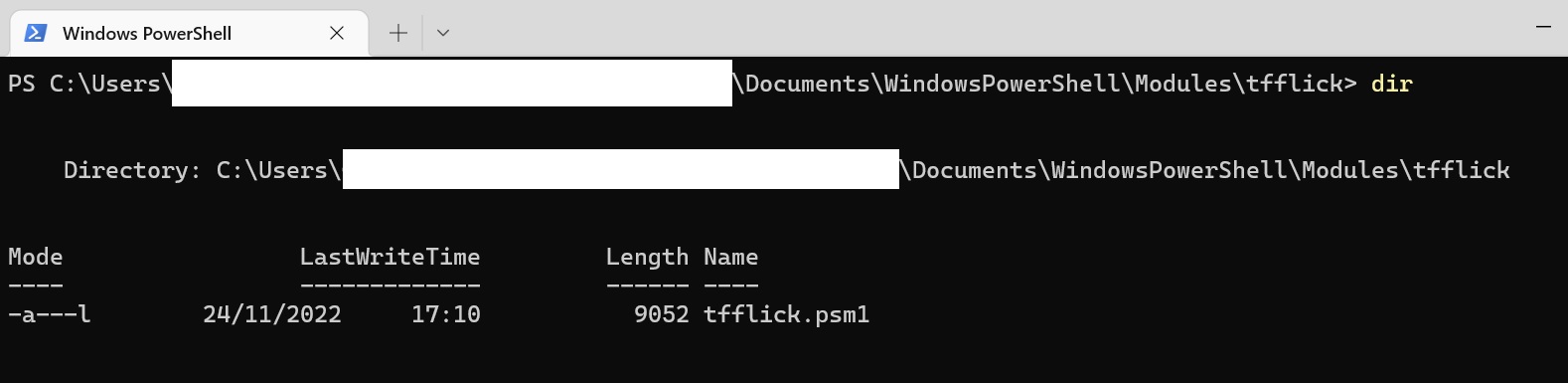
The installer will copy the module to the C:\home directory\Documents\WindowsPowerShell\Modules directory
-
Create an entry in the User
PATHfor the tfflick working directory. -
Create the tfflick working directory in C:\home directory\ called
.tfflick. This directory contains the Terraform executable and downloaded version. -
Optionally unblock the tfflick module
Manual installation
-
Copy the module to the C:\home directory\Documents\WindowsPowerShell\Modules directory Run
$env:PSModulePath -split ";"to view all available Powershell module paths. Copy the tfflick directory and contents to the the Powershell module directory found above.
-
Create the tfflick working directory in C:\home directory\ called
.tfflick -
Create an entry in the User
PATHto thetfflickwork directory created in the previous step.
Removal
- Currently only manual removal is possible. Undo all steps in Manual installation.
Usage
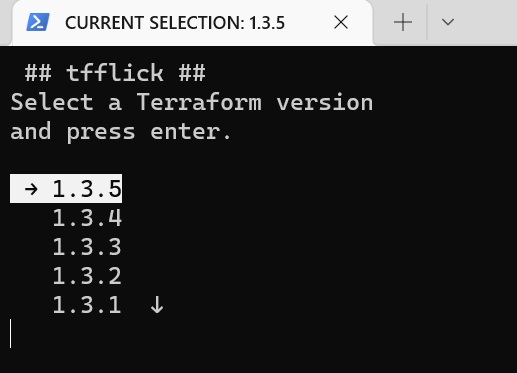
tfflick
- Returns a menu list of available Terraform versions
- Use your arrow keys to select the desired version and press enter
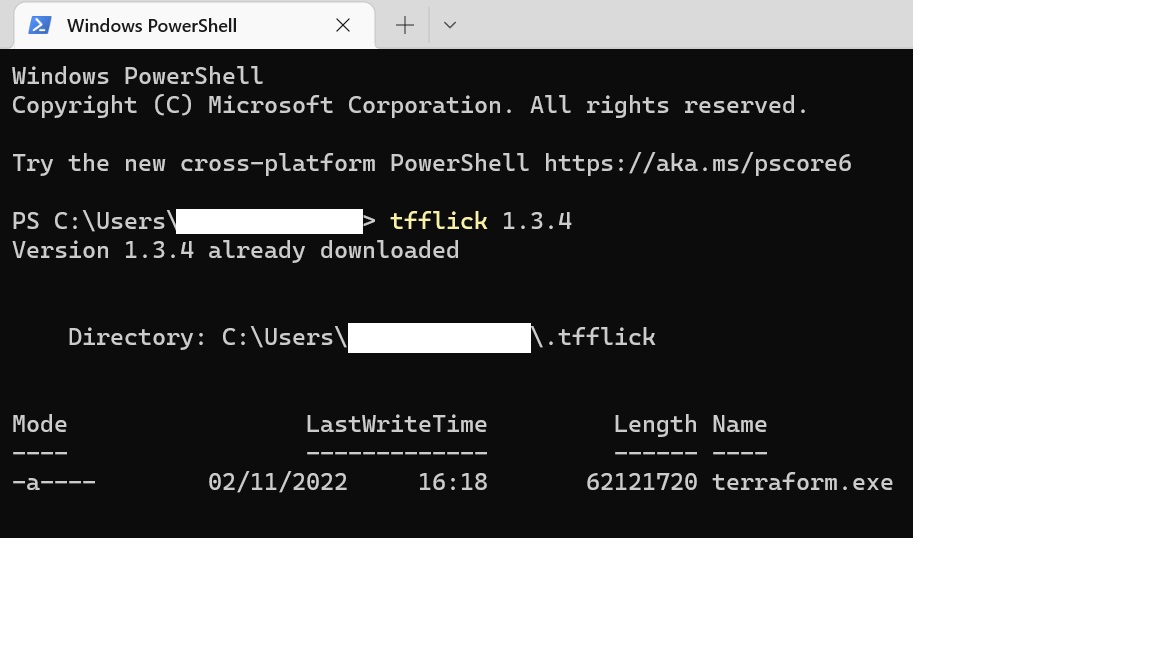
tfflick {version number}
- Pass desired version as the argument. For example
tfflick 1.3.4
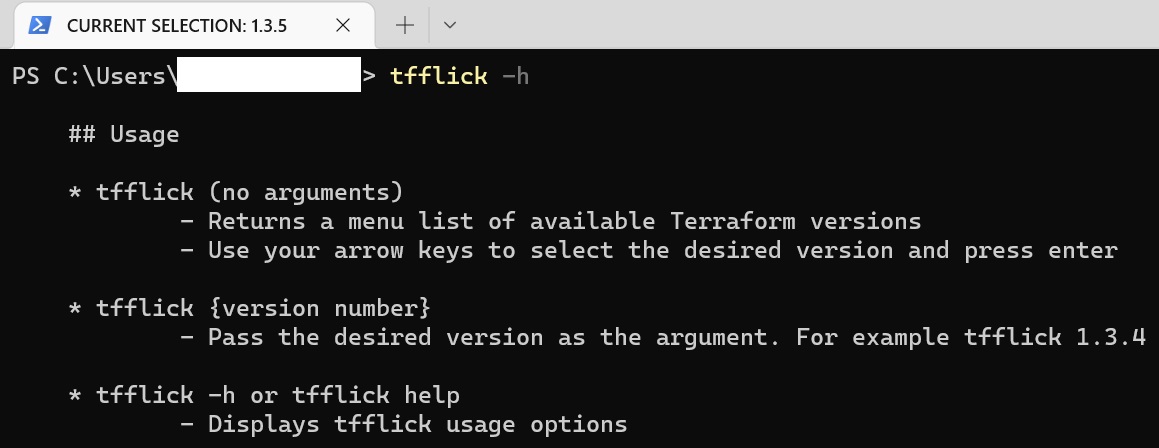
tfflick -h or tfflick help
- Displays
tfflickusage options
Git Bash
You can use a limited version of tfflick in Git Bash. It allows to download and change Terraform versions by calling tfflick {version number} or tfflick -h or tfflick help.
The scrolling menu is not available in Git Bash
Procedure
In Git Bash, append this code to your ~/.bash_profile file. If the file doesn’t exist, you can create it.
vim ~/.bash_profile
Paste/append this code in .bashrc
function tfflick(){
        if [ -z "$1" ]
        then
                echo "Please pass the desired Terraform version number as an argument"
                echo "Example: tfflick 1.3.5"
                echo "Alternatively use tfflick in a Powershell window"
        else
                powershell -command tfflick "$1"
                echo "tfflick has limited functionality in Git Bash."
                echo "To use the full version of tfflick try it in a Powershell window"
        fi
}
Then run:
source .bash_profile
Release Notes
v0.1.3
- Fixed bug with installation where the tfflick module was being copied to the wrong PowerShell module directory in some machines
v0.1.2
- Added information about a new known issue and workaround related to Internet Explorer setup during installation and first Terraform executable download
v0.1.1
- Added instruction for Git Bash usage
- Updated README description
v0.1.0
- Initial release of tfflick module
Known Issues
-
The Terraform executable path can clash with pre-existing paths. For example, if Chocolatey has previously used to install Terraform you might only see this version when running the Terraform executable.
You can uninstall Terraform using Chocolatey with this command:
choco uninstall terraformAlternatively another workaround is to go to Chocolatey’s bin directory and delete the terraform executable. Typically located atC:\ProgramData\chocolatey\bin -
You might see this error in the installation log if you’ve never used Internet Explorer. Most likely Internet Explorer will bring a pop up window asking to complete the set up. The work around is to follow the instructions in the pop up window and retry the installation.
Error:
TerminatingError(Invoke-WebRequest): "The response content cannot be parsed because the Internet Explorer engine is not available, or Internet Explorer's first-launch configuration is not complete. Specify the UseBasicParsing parameter and try again. "
To-Do
- Currently working on improving the menu option - The no argument option of tfflick.
- Make available for Windows 32 bit architecture - availability to download the 32 bit version of the Terraform executable
- Provide Un-installer option
- Add features like recent Terraform versions used and download multiple versions *owershell is supported across platforms, make tfflick platform aware so it can be used more widely.
- Tidy up